Biorn logo

A lightweight PHP framework for building RESTful APIs

Biorn software box with its scaffolding logo and turquoise accents


Build more. Write less. Biorn Wizard guides you through configuring your REST resources and automatically generates their PHP code for CRUD operations, validation, permissions, error responses and database queries.

Powerful queries. Fewer endpoints. Filter across related resources, combine conditions and request nested data through your CRUD endpoints. Add custom filters when your application needs more.

Development time

Under an hour.

10 REST resources, including inheritance.

With your data model diagram ready.

Generated output

  • Relational database
  • REST resources
  • OpenAPI documentation
  • Postman collection

From simple APIs to complex applications, built on established software engineering principles.

A university API, step by step

See how Biorn works through University online, our example of a university management API with students, professors, courses, research papers and tests.

We'll follow this example from its data model to working REST resources, then explore Biorn's features in the sections below.

HOW IT WORKS

From your model to your first API call.

Four steps. One connected workflow. Explore how a university API takes shape with Biorn.

01 / THE STARTING POINT

Your application starts with its relationships.

Map out your classes, attributes and relationships in UML. This model guides the database and the REST resources you will create.

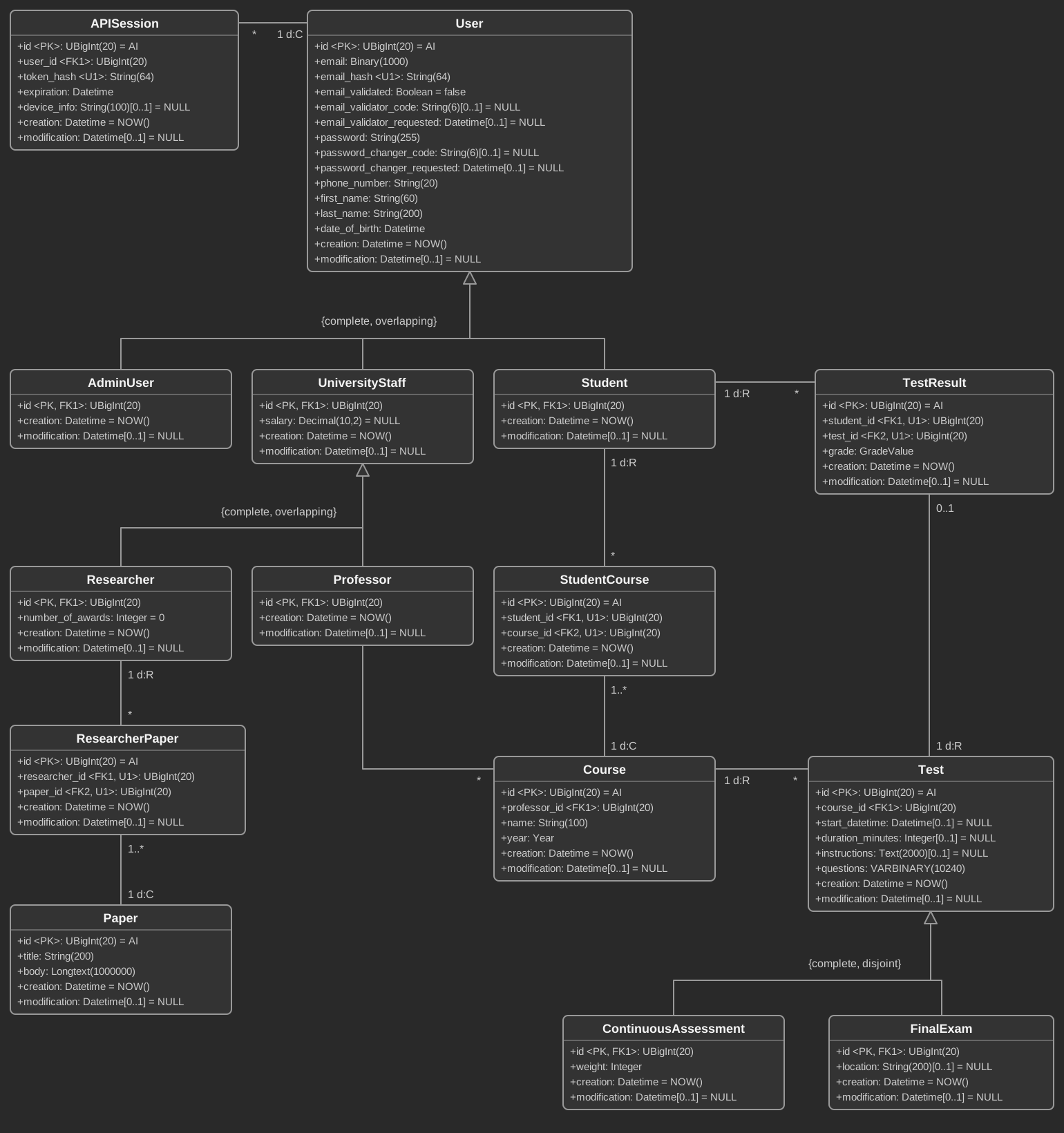
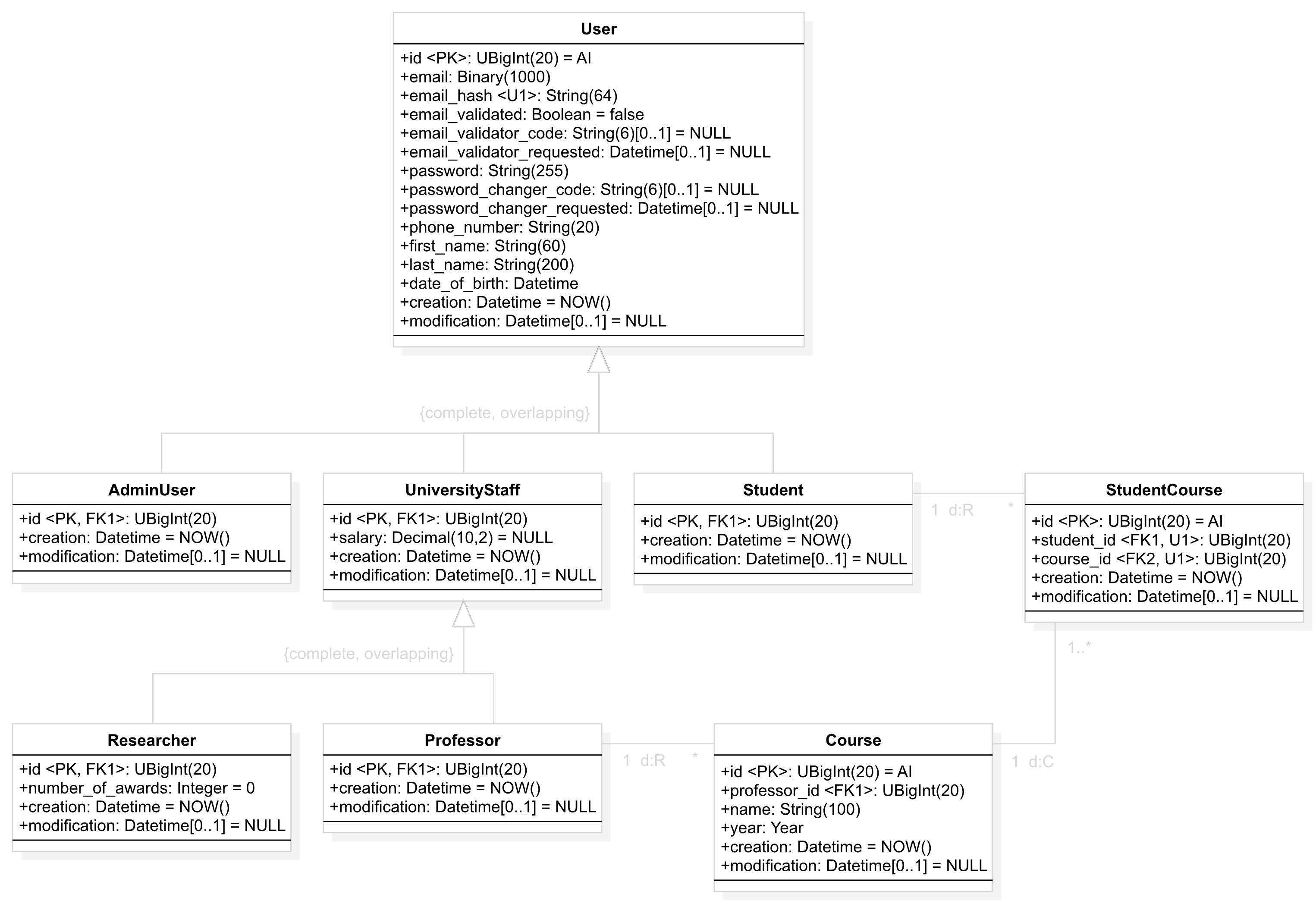
University online brings together users and sessions, teaching, research and assessment. Its model includes multilevel inheritance, overlapping roles and many-to-many relationships.

You design the model. The following steps translate it into your API; there is no automatic UML import.

UNIVERSITY ONLINE · DATA MODEL
University online model with fifteen classes, attributes, types, keys, unique constraints, cardinalities and inheritance relationships.

Open full-size model ↗

02 / THE FOUNDATION

Give your model a database.

Configure your project, environment and database connection. Then use Biorn Wizard to create your tables, foreign keys, columns and constraints.

Once the schema is ready, rebuild its cache so Biorn can use the database structure when generating your resources.

The project README guides the setup. Contextual help in the Wizard explains the database configuration steps.

FROM MODEL TO RELATIONAL SCHEMA
Professorid
Courseidprofessor_id → Professor.idnameyear
Project & environmentTables & relationshipsSchema cache

Runtime requirements: PHP 8.5 & MySQL 8

03 / THE CODE GENERATION

Configure the resource. Generate its PHP code.

Select a table in Biorn Wizard. Define the parameters for Create and Update, their validation rules, and which roles may execute each CRUD operation.

The Wizard generates the resource code for CRUD operations, validation, permissions, error responses and database queries.

Generation is the starting point. Subsequent changes and your own business logic are added directly to the code.

ILLUSTRATIVE CONFIGURATION · COURSE
ParameterValidation
professor_idExisting professor
name1–100 alphabetic characters
yearInteger · 1900–2027

Required for Create · Optional for Update

Courses.phpCreate · Read · Update · Delete

Your generated resource, ready to run and customize.

04 / THE RESULT

Your generated resources are already functional.

Start making CRUD requests without editing the freshly generated resource. Permissions and validation checks are part of the generated flow.

Read courses with pagination, filter by their attributes or follow relationships to filter by a professor’s name—all through the same endpoint.

Generate your OpenAPI documentation and Postman collection to document and explore your API.

EXAMPLE REQUESTS · /courses
Read courses
GET /courses
Find courses by name
GET /courses?filter_by=
name[contains]='Math'
Filter through a relationship
GET /courses?filter_by=
professor.name[equal]='John'

One resource. More ways to query your data.

Get the highlights

Biorn Wizard

Your API's code. Automatically generated.

Define your resources with a visual, step-by-step assistant. Biorn Wizard generates most of your project's source code, guiding you from database structure to REST resource implementation.

  1. Design your project in UML

    Map out your classes, attributes and relationships before building your API.

  2. Create your database

    Turn your data model into database tables, columns and relationships.

  3. Create each REST resource

    Use Biorn Wizard to configure each resource and generate its source code.

What does the Wizard generate?

  • From database columns to API parameters

    Select the database table for your REST resource. Biorn Wizard detects its columns, excluding system fields such as id, creation and modification, and guides you through configuring each API parameter.

    For each field, define its OpenAPI documentation and whether it is required for create operations, update operations, or both.

  • Validation

    Define the types and validation rules for each resource attribute. The Wizard generates the code that checks incoming values.

    For example, require first_name to contain 1–80 characters and no digits, or ensure paper_id references an existing id in the paper table.

  • Permissions

    Choose which user types can execute each CRUD operation. Biorn Wizard generates the corresponding permission checks.

    In our university API, you could allow a Researcher to delete papers while denying that operation to a Student.

  • Dynamic filters

    The Wizard generates the code to filter API requests through query parameters, including filters involving relationships between resources.

    Students enrolled in course 6

    GET /students?filter_by=course.id[equal]=6
  • API responses

    Response handling code is generated too, including structured error responses that explain what went wrong.

    Example validation error

    {
      "success": false,
      "data": null,
      "error": {
        "message": "Invalid request parameters",
        "info": {
          "invalid_parameters": {
            "first_name": "First name cannot be empty",
            "email": "Invalid email address"
          }
        }
      }
    }
Explore the Wizard demo

Advanced, flexible URL-based filtering for GET, PATCH and DELETE

Biorn provides an automatic filtering system that can be applied to all HTTP Read, Update, and Delete requests made to your API. These filters support the AND, OR, NOT, and XOR operators, as well as parentheses. You can also use comparison operators such as equal, less_than_or_equal_to, contains, starts_with, etc.

But the framework goes even further: it automatically allows you to establish relationships between different REST resources through dynamic filters. For example, when making a request to the /students endpoint, you can use dynamic filters to relate it to the course REST resource and cross-reference data.

This represents an enormous time saving, as you don't need to write any additional code to perform more complex queries that your system will inevitably need sooner or later. Let's look at some examples:

  • Students whose first name contains John but not Joey, enrolled in course 8 or 9:
    GET /students?filter_by=first_name[contains]='John' AND NOT first_name[contains]='Joey' AND (course.id[equal]='8' OR course.id[equal]='9')
  • Students enrolled in at least one course:
    GET /students?filter_by=has_between_1_and_INFINITY_courses[equal]='true'
  • Students attending a course taught by professor 6:
    GET /students?filter_by=course.profesor_id[equal]=6

REST resource inheritance: a core innovation of Biorn

One of the fundamental principles of software engineering is inheritance, which allows classes to be specialized according to well-established principles and conventions

One of Biorn's key innovations is its ability to automatically detect and manage inheritance relationships between REST resources. Thanks to its database conventions and the analysis of foreign key relationships, Biorn Wizard identifies inheritance hierarchies directly from the database schema and automatically generates the necessary source code to handle inheritance across CRUD operations (Create, Read, Update, and Delete).

Following established software engineering principles, Biorn supports both complete and incomplete specializations, as well as disjoint and overlapping constraints, covering all four possible combinations.

For example, when reading a Student resource, Biorn automatically includes both the student's own attributes and those inherited from User. Similarly, when updating a Student, you can modify attributes belonging to both the resource and its superclass in a single operation

Biorn also automatically handles complex inheritance scenarios, including the ability to change the subtype of an existing instance. For example, if REST resources B and C both inherit from A, an instance of B can be transformed into an instance of C through an Update operation

Diagrams illustrating resource inheritance combinations

Integrated user management

When you create a new project with Biorn, the User and APISession classes are automatically included, both in the database and in the generated source code. This means that user CRUD operations, authentication, account verification and password management are already implemented, saving you from having to develop them from scratch

👉🏻 Furthermore, relationships between User (and its subclasses) and other resources often imply access restrictions. Biorn Wizard can automatically propose these restrictions by analyzing the relationships defined in your database

Let's look at a practical example to see how this works and how much development time it can save

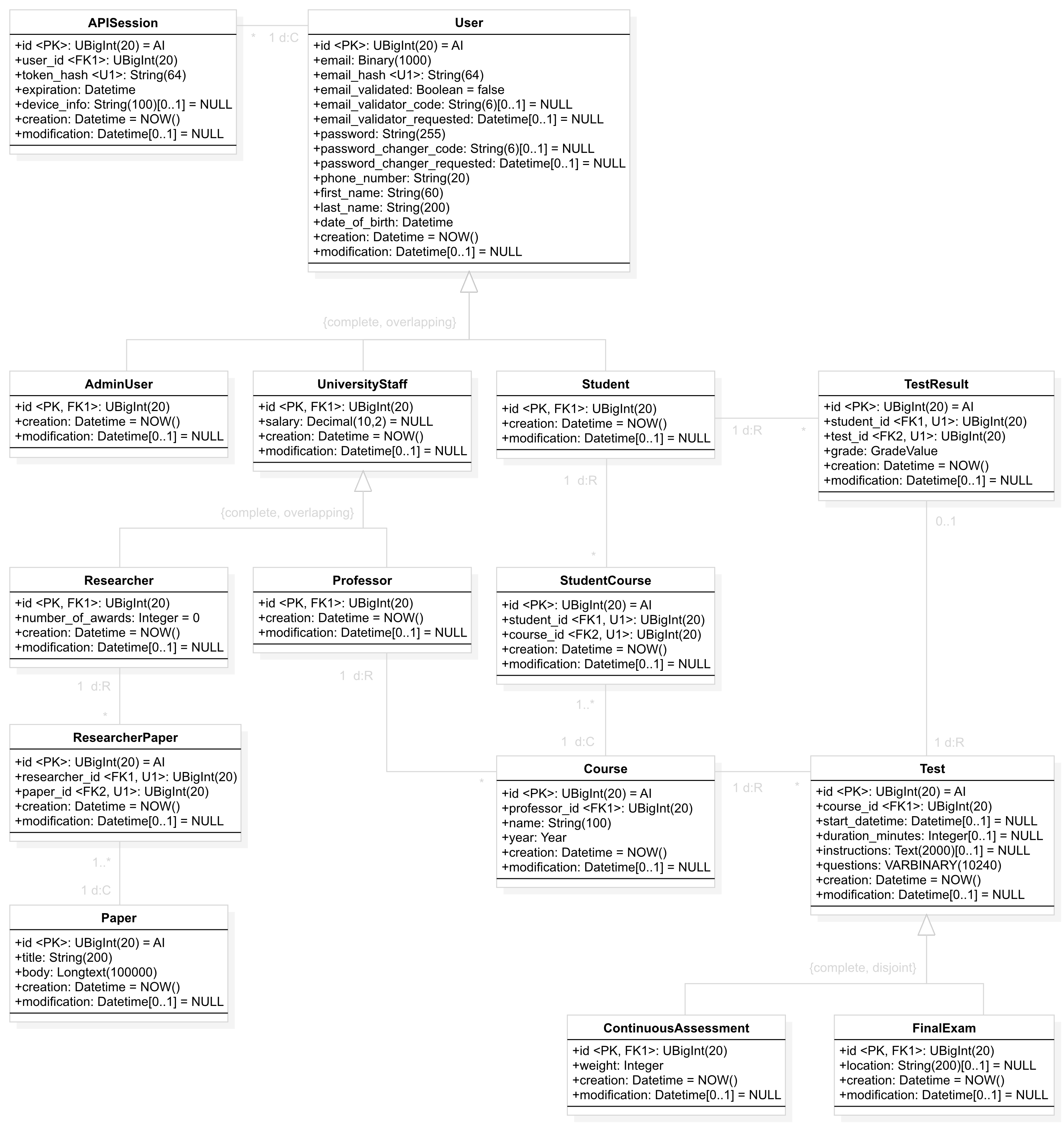
Suppose you want to develop an API with the following database schema:

University API database diagram showing User, Student, Professor, Researcher, courses, tests and related resources

Based on these relationships, your API will probably need restrictions such as:

  • Researchers, professors and students may only update their own user information; administrators may be allowed to update any user's information.
  • A researcher may only edit papers with which they are associated, not every paper in the database.
  • A student may only access their own test grades, not those of other students.
  • A professor may only create and edit tests for courses they are responsible for.

Biorn Wizard automatically generates the source code for your REST resources and proposes the corresponding security filters. You can review, modify or remove these filters whenever necessary.

When an API request is executed, the applicable security filters are automatically placed at the top of the filtering hierarchy. This prevents users from bypassing their access restrictions by supplying their own dynamic filters in the request.

In short, Biorn helps you automatically handle access restrictions derived from the relationships between users and other resources.

Biorn also supports users who inherit from multiple user types simultaneously. For example, the same person can be both a student and a professor. Here's how Biorn handles this situation.

Following the diagram above, suppose a user is both a professor and a student. After authenticating with the API and obtaining an access token, an important question arises: how should the API interpret the following request?

GET /courses
  • When acting as a student, the request should return the courses in which the user is enrolled.
  • When acting as a professor, the request should return the courses for which the user is responsible.

To resolve this ambiguity, Biorn provides the Biorn-User-Role HTTP header. It allows an authenticated user to specify which of their available roles they are acting as for a particular request, so the API can apply the appropriate access rules. In this example, the header could contain student or professor.

Automatically generate OpenAPI documentation and Postman collections

Documenting an API is one of the most important steps in its development. The software industry has agreed upon the open OpenAPI standard for this purpose. You'll be pleased to know that Biorn has been developed with this standard in mind, so that once you have completed your project, all your project's OpenAPI documentation will be generated automatically with a single click.

When you create each REST resource using Biorn Wizard, the visual assistant will ask you to provide all the information needed to comply with the OpenAPI standard. For example: descriptions of the behavior of each CRUD operation, example values for each attribute along with its data type, the response format for each API call in both successful and error scenarios, and more.

Additionally, once you have created all your API's REST resources using the visual assistant, you'll be pleased to know that your entire API can be exported as a Postman collection with a single click, allowing you to start making test requests right away.

OpenAPI logo Postman logo

Nested resource data

Sometimes a REST response should include related objects. Biorn lets you request nested properties and select which attributes are returned.

Simplified university API resource relationship diagram
GET /courses?filter_by=student.id[equal]='16'

GET /courses?filter_by=student.id[equal]='16'&nested_properties=professor

The second request includes the associated professor in each course's response. Nested properties can also reference more distant resources through existing relationships.

Feather symbolizing a lightweight framework
Very small footprint

A complete API. Just 3.8 MB.

Biorn is a surprisingly lightweight PHP framework. The entire University online project, including Biorn and its Wizard, contains just 237 files. Only 18 needed to be generated with the Wizard: our REST resources for Student, Course, Professor and more.

No third-party PHP packages. No external package repositories required. A self-contained codebase means fewer package dependencies to maintain and resolve when moving your project between environments.

Complete Biorn example vs. measured framework starting points · unpacked contents
FrameworkFiles / unpacked entriesUnpacked size
Biorn University online · complete project2373.8 MB
Laravel 13.38.0 · fresh application6,61828.6 MB
API Platform + Symfony 5.0.5 / 8.1.9 · packages with Doctrine ORM4,20122.7 MB
FastAPI 0.161.1 · standard extras, including Uvicorn2,89840.4 MB
Spring Boot 4.1.2 · Web MVC runtime dependencies11,198Class and resource entries inside 39 JARs44.7 MB19.7 MB as packaged JARs

Comparison of project footprint, not equivalent functionality. Competitor starting points include production dependencies, before implementing University online. Sizes use decimal MB; runtimes and build tools are excluded. PHP and Python dependencies are counted as installed files. Spring counts non-directory entries inside its 39 JAR dependencies, with their uncompressed size; these are compiled classes and resources, not source files. Biorn figures supplied by its creator. Measurement details and versions.

More features

Automatic field encryption and decryption

During database creation, the columns you want to encrypt must be defined as VARBINARY. For example, you might define the email column in the user table this way.

Once that is done, you will not need to write a single line of code specifically to encrypt or decrypt those fields when executing Create, Read and Update operations through your API. Biorn handles the entire process automatically.

Automatic, multilingual API error responses

Using Biorn Wizard, you define which parameters each CRUD operation must or may receive, together with their validation rules. The framework then takes care of generating the corresponding error responses automatically.

Consider the university example. When creating a Course with Biorn Wizard, you could specify that professor_id, name and year are mandatory for Create operations but optional for Update operations. You could also specify that, for both Create and Update, professor_id—when supplied—must be an integer matching an existing id in the professor table. This is one of Biorn's predefined validation rules.

For the name attribute, you could require a string between 1 and 100 characters containing only letters, numbers and spaces. This is another predefined rule. All the source code needed to detect violations of these rules and return the appropriate error messages is generated automatically.

In some situations, it is preferable for an API to return errors in different languages, according to the languages supported by the API and the HTTP Accept-Language header. Biorn includes its own multilingual system, allowing error messages produced while processing CRUD requests to be generated automatically in multiple languages. If your API supports only one response language—for example, English—the framework also supports that simpler scenario.

Of course, you can also easily override any default API error message with completely custom text.

Multiple deployment environments

Configure as many environments as your project requires, such as development, production and preproduction.

Each environment can use its own database, as well as a unique encryption key and hash salt.

Step-by-step project setup

When you start a new project, a README.md file provides a step-by-step guide to building an API with Biorn from scratch.

The guide comprehensively covers project configuration, database creation, environment setup and the creation of all your project's REST resources. At each stage, it explains which manual actions are required and directs you to Biorn Wizard whenever appropriate.

Biorn Wizard is itself a guide: every step is explained fully and clearly, with the aim of making the process understandable to any developer familiar with the basics of programming and RESTful APIs.

Human-led development, with selective AI assistance

AI is an important tool today. During Biorn's development, it has been used mainly for advice, guidance on compliance with international standards and the programming of small code fragments.

The more demanding algorithms and the development process as a whole have been carried out by human software engineers in a controlled, deliberate manner.

Once your project is generated, AI can help you understand and extend it — for example, by building complex filters with Biorn's filtering classes.

Versioned CRUD operations

All methods in your REST resources include an explicit version number in their name. For example, Students.php might define read_v1_0 (version 1.0) and read_v2_1 (version 2.1).

The Biorn-API-Version HTTP header indicates which API version to use for each request.

For example, when calling GET /students with Biorn-API-Version: 2.1, Biorn executes Students->read_v2_1. If read_v2_1 does not exist but read_v1_0 does, it executes Students->read_v1_0 instead, searching backwards through earlier versions.